
Last updated on
Nov 7, 2026

Immunize P3060 2021-2026 free printable template
pdfFiller is not affiliated with any government organization

Fill out
Complete the form online in a simple drag-and-drop editor.

eSign
Add your legally binding signature or send the form for signing.

Share
Share the form via a link, letting anyone fill it out from any device.

Export
Download, print, email, or move the form to your cloud storage.
Why pdfFiller is the best tool for your documents and forms


End-to-end document management
From editing and signing to collaboration and tracking, pdfFiller has everything you need to get your documents done quickly and efficiently.
Accessible from anywhere
pdfFiller is fully cloud-based. This means you can edit, sign, and share documents from anywhere using your computer, smartphone, or tablet.
Secure and compliant
pdfFiller lets you securely manage documents following global laws like ESIGN, CCPA, and GDPR. It's also HIPAA and SOC 2 compliant.
What is Immunize P3060
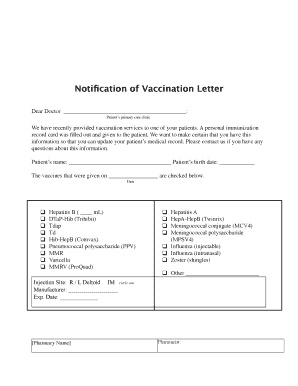
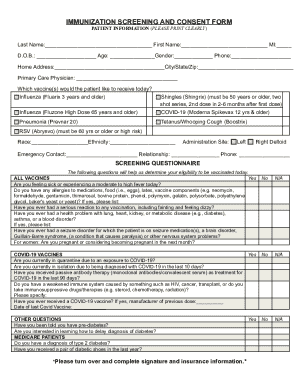
The Vaccination Notification Letter Template is a patient consent form used by healthcare providers to inform a patient's primary care clinic about vaccines administered.
pdfFiller scores top ratings on review platforms




Who needs Immunize P3060?
Explore how professionals across industries use pdfFiller.

Immunize P3060 is needed by:
-
Healthcare providers notifying clinics about vaccinations
-
Patients requiring records of vaccination for medical purposes
-
Administrators of immunization information systems
-
Primary care clinics updating patient medical records
-
Public health officials tracking vaccination rates
Comprehensive Guide to Immunize P3060
What is the Vaccination Notification Letter Template?
The Vaccination Notification Letter Template serves as a crucial document in healthcare for tracking patient vaccination information. This form functions to assist healthcare providers in notifying a patient's primary care clinic about vaccines administered, ensuring that medical records are accurately updated. Key details typically included in this template comprise patient identification, vaccine specifics, and clinic contact information.
Purpose and Benefits of Using the Vaccination Notification Letter Template
Utilizing the Vaccination Notification Letter Template presents several advantages for healthcare providers. Firstly, it guarantees accurate reporting of administered vaccines, which is essential for maintaining up-to-date patient records. Secondly, this template enhances communication between healthcare professionals and primary care clinics, contributing to seamless patient care. Lastly, it facilitates compliance with immunization information system regulations, ensuring adherence to established guidelines.
Key Features of the Vaccination Notification Letter Template
This template is designed to be user-friendly and effective. Its notable features include:
-
Fillable fields for essential details like patient information, vaccine data, and clinic contact information.
-
Clear instructions that guide users through the completion process to enhance accuracy.
-
Online accessibility via pdfFiller, allowing easy editing and sharing of the document.
Who Needs the Vaccination Notification Letter Template?
The primary users of the Vaccination Notification Letter Template include:
-
Healthcare providers responsible for administering vaccines.
-
Primary care clinics that receive and utilize vaccination records.
-
Patients looking to update their personal medical records with vaccination information.
How to Fill Out the Vaccination Notification Letter Template Online
Filling out the Vaccination Notification Letter Template online can be accomplished by following these steps:
-
Access the template on the pdfFiller platform.
-
Enter critical information, including the patient’s name, birthdate, and vaccines administered.
-
Review and validate all entries to ensure accuracy prior to submission.
Important Submission Details for the Vaccination Notification Letter Template
When it comes to submitting the completed Vaccination Notification Letter Template, consider the following methods:
-
Submission can be completed electronically or in paper format, depending on clinic preferences.
-
Include the correct contact information for the primary care clinic to ensure proper delivery.
-
Be aware of any applicable fees or processing times associated with submissions.
Common Errors to Avoid When Using the Vaccination Notification Letter Template
To ensure a successful completion and submission of the template, be mindful of common errors, such as:
-
Missing or incorrectly entered information in required fields.
-
Omitting signatures or dates, if necessary.
-
Failing to double-check entries for accuracy before submission.
Security and Compliance for the Vaccination Notification Letter Template
Handling sensitive health information requires vigilance. The pdfFiller platform employs security measures, including:
-
256-bit encryption to protect user data.
-
Compliance with HIPAA and GDPR regulations regarding patient privacy.
-
Recommendations for securely storing and sharing completed forms to prevent unauthorized access.
Why Choose pdfFiller for Your Vaccination Notification Letter Template Needs
Choosing pdfFiller simplifies the process of completing the Vaccination Notification Letter Template due to its valuable features, such as:
-
User-friendly interfaces that allow for easy editing and filling of forms.
-
Robust security protocols integrated to protect sensitive documentation.
-
Positive user feedback showcasing successful outcomes when using the platform.
Get Started with Your Vaccination Notification Letter Template Today!
Start using the Vaccination Notification Letter Template with the ease and efficiency offered by pdfFiller. If you require assistance, support resources are available. Join the millions of users who have benefitted from pdfFiller’s comprehensive features.
How to fill out the Immunize P3060
-
1.Access pdfFiller and search for 'Vaccination Notification Letter Template' in the template library.
-
2.Open the form by clicking on the document title, which will bring up the interactive editing interface.
-
3.Before filling out the form, gather necessary information like the patient's full name, birthdate, vaccines administered, and clinic contact details.
-
4.Navigate through the fields using the tab key or your mouse, filling out each section correctly. Ensure to provide accurate and up-to-date information.
-
5.Review all filled fields for completeness and accuracy. Use pdfFiller's review features to spot any potential errors or missing data.
-
6.Finalize the form by clicking the 'Done' button. This will prompt you to save your progress.
-
7.Choose to save, download, or submit the form directly through pdfFiller's user-friendly options. Select the appropriate method that suits your needs.

Who is eligible to use the Vaccination Notification Letter Template?
Healthcare providers who administer vaccines and need to inform a patient's primary care clinic about the vaccination details can use this template.
Are there any deadlines to submit the vaccination notification?
While the template does not specify submission deadlines, it is advisable to send notifications promptly after vaccines are administered to ensure timely updates to medical records.
What methods can I use to submit the completed form?
You can submit the completed Vaccination Notification Letter via email or physical mail to the primary care clinic, or directly through pdfFiller’s submission features.
What information do I need to complete the form?
You will need the patient's full name, birthdate, details of the vaccines administered, and the contact information of the clinic. Gathering this information in advance will aid in filling the form accurately.
What are common mistakes to avoid while completing this form?
Ensure all patient information is accurate and up-to-date. A common mistake is omitting essential details like the dates of administered vaccines or clinic contact information.
How long does it take to process the vaccination notification?
Processing times can vary based on the clinic's administrative workload, but typically updates to patient records are made within a few days of receipt.
Can I modify the template if needed?
Yes, pdfFiller allows you to customize the Vaccination Notification Letter Template as needed to fit specific details or requirements of your practice or clinic.
Immunize P3060 Form Versions
Related Content
Related Forms




Get the latest insights from our blog


If you believe that this page should be taken down, please follow our DMCA take down process
here
.
This form may include fields for payment information. Data entered in these fields is not covered by PCI DSS compliance.